
With Family Empowerment Scholarship (formerly Gardiner) servicing more students than ever, I thought I would take a second to create a post to help new scholarship recipients navigate the Gardiner reimbursement process. Full disclosure, this blog post is being composed July, 2021. The expanded FES program goes into effect this month. I fully expect the process to change in the near future. I will update this process if and when changes are made.
What is FES (Gardiner)?
If you’re not sure what the FES (formerly Step Up for Students Gardiner) is, please visit https://www.stepupforstudents.org/for-parents/special-needs/how-the-scholarship-works/
How does the scholarship work?
Once you apply, you will be listed as “pending” then changed to be “awarded” when deemed eligible (Note: awarded is different than funded). You may be on the pending list for some weeks or even months.
If you apply later in the school year, you may be wait listed which means the scholarship does not have the funds for your account presently but funds may be freed up later in the year or the following year. Being on the wait list bumps you up on the priority list for the following year. It is worth it to get on the list as soon as possible.
Once “funded,” scholarship funds are placed in your account.
The 2021-22 scholarship amounts are still to be determined.
The three ways to use Gardiner:
- Reimbursement – The parent pays for the items up front then submit a request to be reimbursed. Please refer to the Gardiner handbook regarding which items are pre-approved for reimbursement. Items and services not specified on the list need pre-approval. https://www.stepupforstudents.org/for-parents/special-needs/apply-now/parent-handbook/
- Direct Pay Provider Reimbursement – If the provider is registered with Gardiner, they are called “Direct Pay Providers.” These organizations submit the reimbursement request for their services. The parent’s only responsibility is to approve the reimbursement.
- My Scholarshop is an online store where parents can purchase items and curriculum directly using your scholarship funds. All items in the Scholarshop are pre-approved and are shipped directly to the client. It expedites the process by reducing the reimbursement requirements. (Note: Some stores are slower at shipping items than others. Some, like the Best Buy and Lakeshore products, came quickly while others, like Rainbow Resources, took weeks and even months to receive.)
How to submit a reimbursement
Submitting a Gardiner reimbursement is a lengthy process. I joke that submitting Gardiner invoices is my part-time job. And, in some ways, as both a provider and recipient, it really is. It typically takes a few hours of my work week to submit Gardiner invoices.
The website is notoriously slow (Pro Tip: do your reimbursements before 8am, the website is always faster between 6-8am).
The approval processing is slower – taking 3-6 weeks from submission to payment. Even though it is slow, I am grateful for the process as it shows the organization upholds its ethical duty to ensure funds are not mismanaged. As a parent and tax payer, it should be appreciated that funds are being monitored and deemed educationally pertinent.
So, here’s the process…
- Log in to your account.
- Go to your “Account Activity” tab.
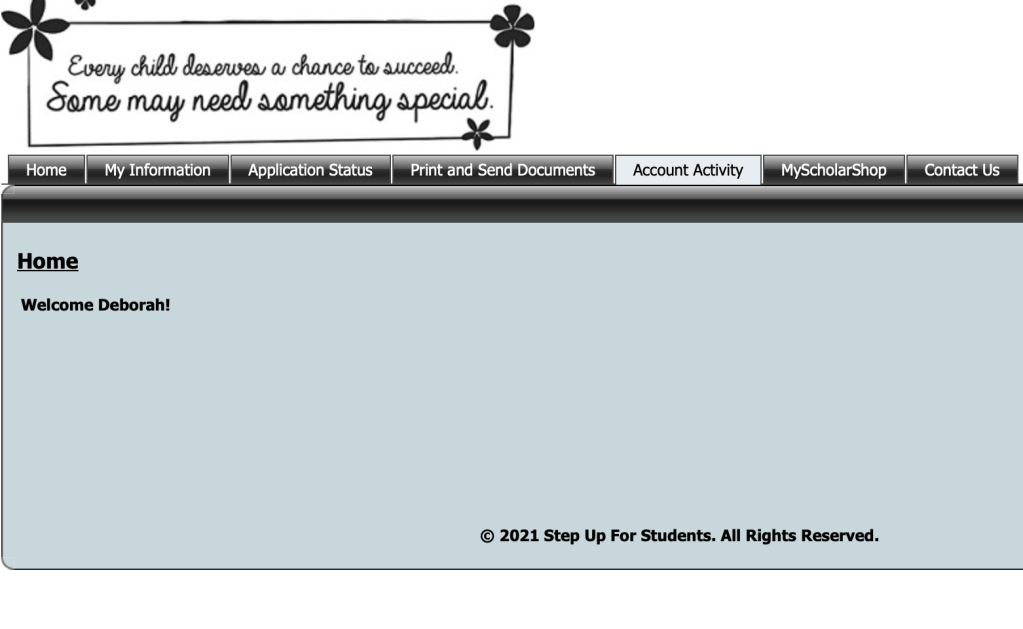
3. Click on the “Submit a reimbursement Request” tab.

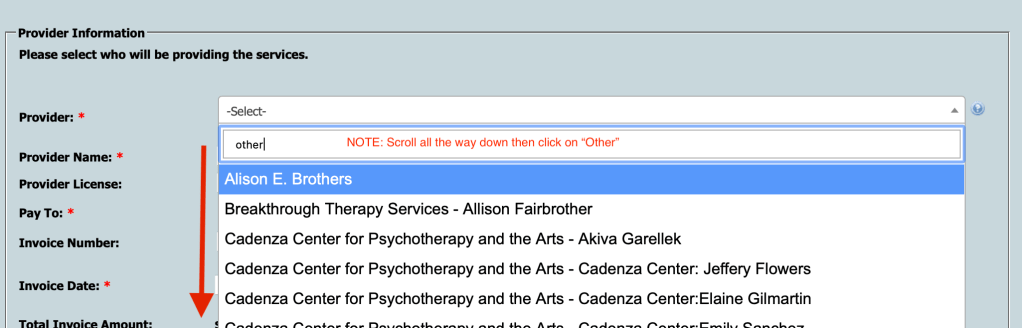
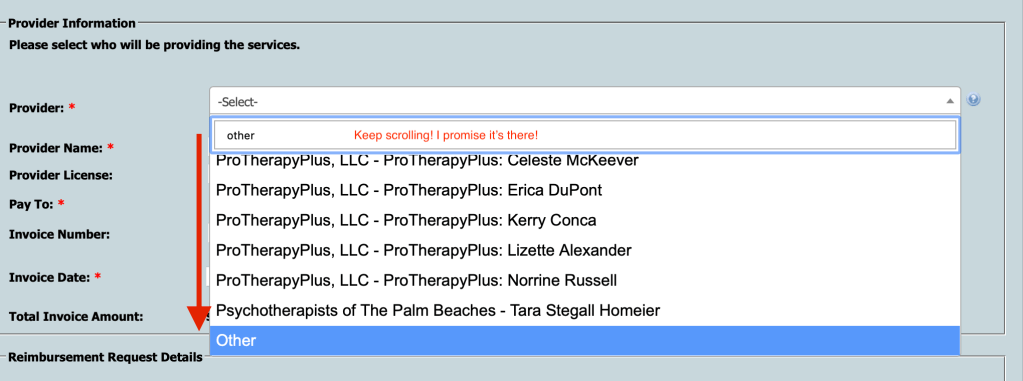
4. Start with the Provider. The vast majority of providers are not listed on the Provider drop-down. If the Provider is not listed, type in “Other.” You’ll have to scroll down to find the not-so-conveniently placed “other”at the absolute bottom of the list of Providers.
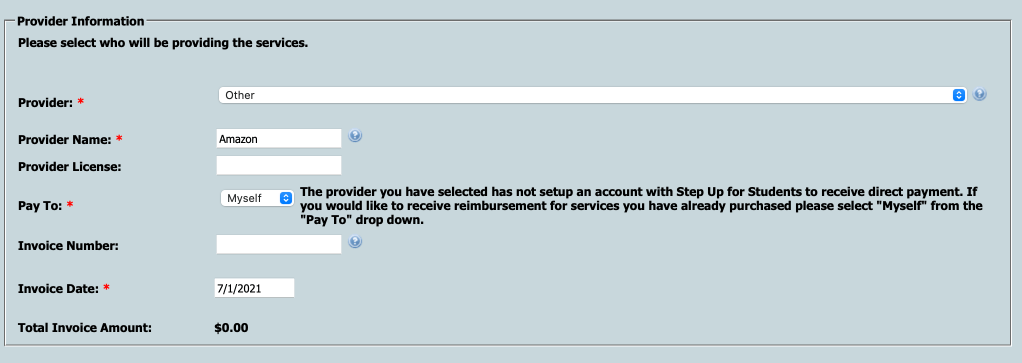
5. Type in the Provider information. This could be the name of an organization, therapist, tutor, or store. In most cases, you will do “Pay to” “Myself.” The invoice number is optional but often helpful as some reimbursements look similar. The invoice date can be the date the invoice is paid or the date the reimbursement is submitted.
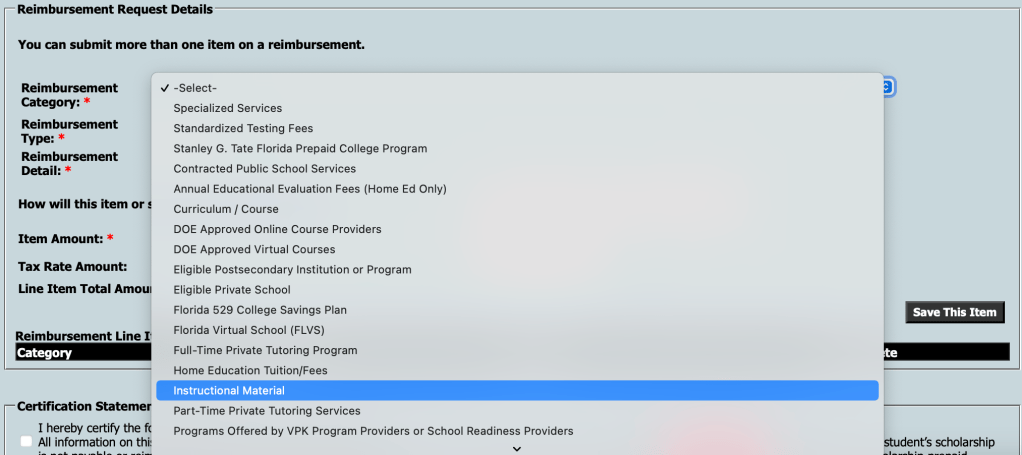
6. Complete the Reimbursement Details. Starting with the category, scroll down each item list to describe the item/service being reimbursed. This is a sample of how books would be listed.
7. Once the request details are completed, Click Save Item.
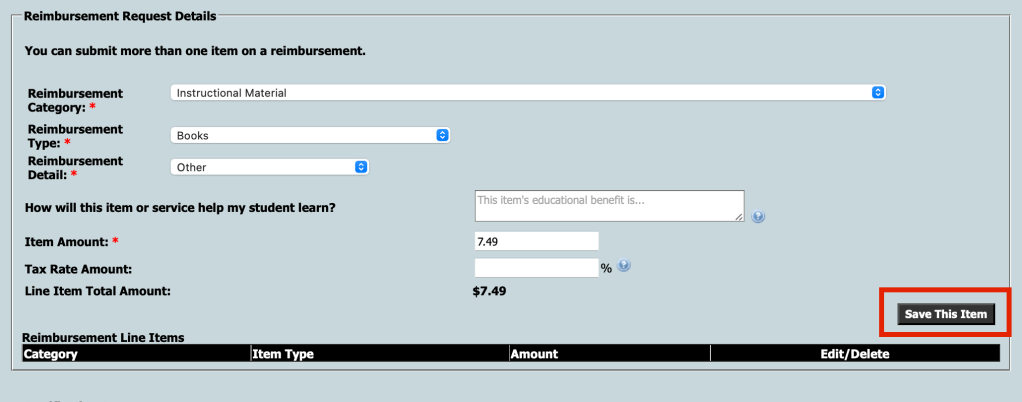
8. Once the item is saved, you can add another item from the same Provider; however, this is rare. It also complicates the process which, if not done correctly, can delay the reimbursement by weeks. I recommend doing one item per reimbursement.
9. This image shows how the form will look when you mark the Certification Statement and Submit.
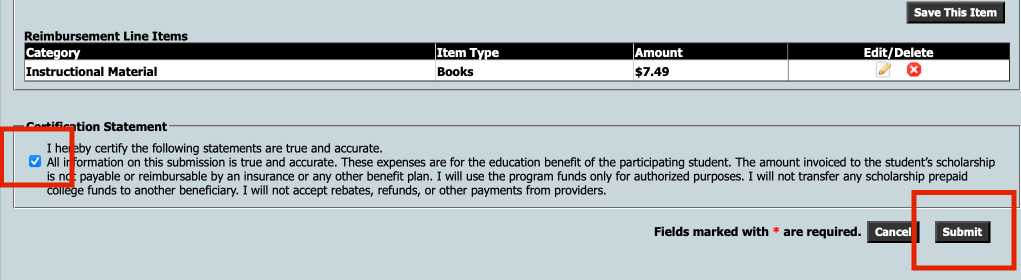
10. Upload Supporting Documentation. After you submit, the screen will ask you to upload documents.
Supporting documents include, but are not limited to: PAID invoices, picture/screenshot of your bank or credit card statement showing payment, lesson plans, notes from therapists/tutors regarding the educational purpose of the produce/service.
You can upload PDFs, JPEGs, and a variety of other formats (but not Word documents). You should be able to upload a few supporting documents with each upload. The more supporting documents, the quicker the approval.
On questionable items, provide lesson plans to show how the item is being used educationally.
Pro Tip: Make sure the invoice submitted shows the invoice was mark PAID, 0 balance, and lists the form of Payment (i.e. Paid by PayPal, Paid using Card XXXX). If these are not listed on the invoice itself, upload a picture (screen shot) of the posted transaction from your bank, PayPal, or credit card account. They will want to make sure the item has indeed been paid. Warning: failing to provide this proof will delay the reimbursement by weeks.
Waiting for payment
Once submitted, the FES process will take about 3-4 weeks – June, July, September, October (beginning and ending of each funding year) are typically slower months.
Your reimbursement will show up on your account as demonstrated in the next screen shot.
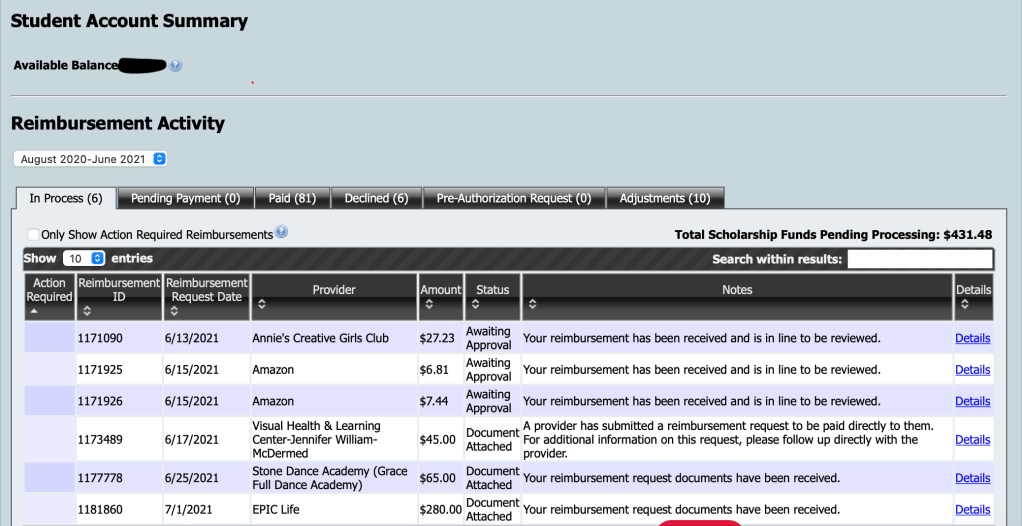
Document Attached – means your reimbursement and documents have been submitted
Oh Hold – means you need to provide more supporting documents (this could take a while)
Awaiting Approval – means everything looks good and your reimbursement is in line to be approved and paid. I’ve personally never had an “awaiting approval” not paid.
After Awaiting Approval, the item is moved into “Pending Payment” tab for a few days then is moved to the Paid tab. Once paid, the money arrives to your bank account in 2-3 business.
For more assistance…
I hope you have found this tutorial helpful. I know how difficult it was for me to figure out the process when I first started. I’ve also had to walk a number of clients through the process – figured this blog might help.
If you need more assistance or have specific questions, email FES (Gardiner) using the email tab on the website. They have an amazing team of customer support agents who respond quickly.
You can also email me at DeborahKlineConsulting@gmail.com for more information about the program from a Provider and Recipient perspective; however, I may not have the answer to questions about specific reimbursements.
 Deborah Kline, EdS